
For the purpose of focusing a DSLR camera, pressing the AF-ON button has the same effect as pressing the shutter-release button halfway. To set the camera to use the AF-ON button for focusing, you will need to set a custom function, which can be found in custom settings, under Autofocus. This technique is also called back button focus.
The default setting on Nikon DSLR cameras sets Shutter/AF-ON in which both the shutter-release button and the AF-ON button can be used to initiate autofocus; or you can choose to set the AF-ON button only for focus, which means only the shutter-release button will only activate the shutter (snap the picture) when pressed.
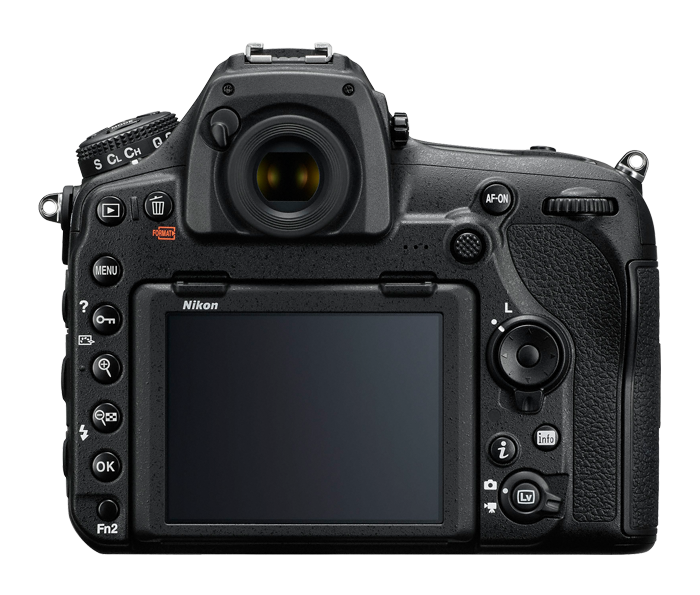
The first advantage comes when dealing with those certain compositions where your subject sits in the part of the frame where there is no focus point. In the past, you would have to focus, recompose, shoot. The problem here is that after that first frame if you release the shutter button all the way you will have to focus again the next time you press the shutter. So now you have to focus, recompose, shoot, repeat over-and-over again each time you press the shutter button. Another problem with this is that you are constantly moving the camera to lock focus which distracts you from fine-tuning your composition. With back-button focus, all you have to do is focus one time, recompose, and shoot until you're done. Unless your subject moves forward or back, you don't have to press the focus button again. Now you can shoot and make small adjustments to your composition while you shoot as needed without having to worry about focusing each time.
One of the biggest struggles with autofocus comes from the use of single and continuous autofocus. Before, you had to choose what setting to use. If you needed to focus and recompose, then you had to choose single. This way you could half-press the shutter to lock focus, recompose, then take your image. But then if something with movement started to happen you would miss the shot because you didn't have the right focus mode.
If you had continuous autofocus selected, you would be fine for anything with motion as well as anything that was still. The problem here is that your subject had to be located in part of the frame where there was a focus point. If you needed to move the frame so that the focus point was no longer on the subject, the continuous autofocus would make the camera automatically refocus on wherever the focus point was placed.
When you have back-button focus set up you actually get the benefits of both modes without any of the drawbacks. The way this works is that you have the camera always set to continuous autofocus. This way when you are tracking the movement of a subject you just hold down the back-button as you simultaneously press the shutter to capture images. When you run into a situation where you need to focus and recompose, all you have to do is press the back-button to focus, release the back-button, then recompose and shoot. Because the camera only focuses when you press the back-button, you’ll never have to refocus until you or your subject moves.